Topiry



10 Best AI Productivity Tools for Remote Teams in 2026 (In-Depth Review)
Topiry tested dozens of AI tools built for distributed teams and narrowed the field to ten that eliminate real coordination busywork — not just add another notification.
Remote work didn’t just change where people sit — it changed how coordination happens. Without hallway conversations and shared whiteboards, teams have quietly outsourced huge amounts of coordination work to software. In 2026, the sharpest edge of that shift is AI: tools that don’t just store information but actively summarize it, schedule it, or act on it. The Topiry Team evaluated dozens of AI productivity tools built specifically for distributed teams and narrowed the list down to ten that consistently solve real coordination problems rather than adding another notification to ignore.
How We Evaluated These Tools
We prioritized four things: how much manual busywork the AI actually eliminates, how well the tool fits into an existing stack rather than demanding you rebuild your workflow around it, reliability of the AI outputs (fewer hallucinated summaries, fewer scheduling conflicts), and whether the tool scales from a five-person team to fifty.
1. Notion AI — Best for Shared Knowledge Bases
For distributed teams, the biggest silent killer of productivity is “where is that documented?” Notion AI’s ability to search and summarize across an entire connected workspace turns scattered notes into something closer to an internal search engine. It shines especially for onboarding new remote hires who need fast answers without pinging five people on Slack.
2. Motion — Best for Automated Scheduling
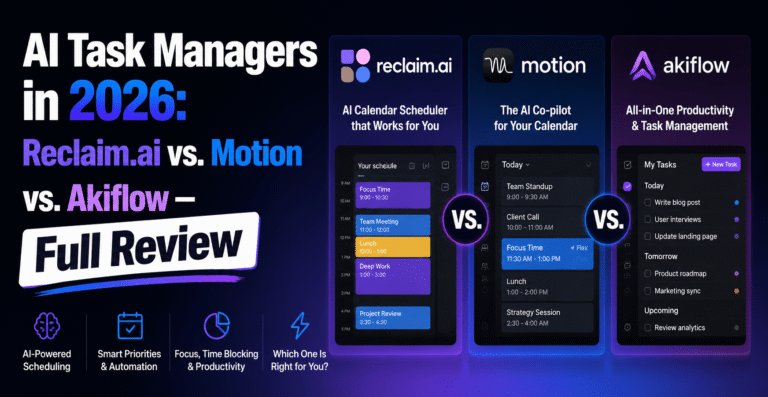
Motion’s algorithmic calendar management is particularly valuable for remote teams spread across time zones, where manual scheduling turns into an email chain nobody enjoys. By auto-blocking focus time and re-shuffling tasks around meetings, it reduces the coordination tax that async teams pay constantly.
3. Fireflies.ai — Best for Meeting Transcription and Recall
When half your team can’t attend a meeting live because of time zones, Fireflies.ai’s automatic transcription and searchable meeting recall becomes essential rather than a nice-to-have. It generates summaries and action items automatically, meaning nobody has to be “the note-taker” anymore.
4. Slack AI — Best for Channel Summarization
Catching up on a channel with 400 unread messages used to mean scrolling for twenty minutes. Slack’s built-in AI summarization condenses long threads into a few bullet points, which matters enormously for async-first teams working across staggered hours.
5. Superhuman — Best for Inbox Triage
Superhuman’s AI-assisted email client focuses on speed: triaging, summarizing, and drafting replies faster than a standard inbox. For remote managers drowning in cross-timezone email threads, the time saved on triage alone can reclaim a meaningful chunk of the workday.
6. Reclaim.ai — Best for Protecting Focus Time
Reclaim.ai works by treating personal habits — deep work, breaks, even exercise — as calendar events that get defended the same way a meeting would. For remote workers whose calendars get invaded by back-to-back video calls, this habit-protection approach is a genuine antidote to burnout.
7. Otter.ai — Best for Cross-Team Meeting Notes
Otter.ai’s real-time transcription and collaborative meeting notes make it easier for remote teams to keep a written record that’s searchable later, reducing the “can someone remind me what we agreed on” problem that plagues distributed teams.
8. ClickUp AI — Best for Project Status Updates
ClickUp’s AI layer can auto-generate project status summaries pulled directly from task activity, which is a substantial time-saver for managers who otherwise spend Friday afternoons manually compiling updates for stakeholders.
9. Grammarly Business — Best for Consistent Written Communication
For remote teams, writing is communication — tone gets misread easily without body language. Grammarly’s AI tone detection and rewriting help distributed teams sound consistent and avoid the classic “was that email passive-aggressive or am I overthinking it?” spiral.
10. Zapier AI — Best for Connecting Everything Else
None of the tools above work in isolation, and Zapier’s AI-assisted automation builder helps remote teams stitch them together — auto-creating tasks from meeting summaries, or triggering Slack updates from calendar changes — without needing an engineer to write custom integrations.
Comparison at a Glance
| Tool | Primary Use Case | Best Team Size |
|---|---|---|
| Notion AI | Knowledge base & docs | 5–500+ |
| Motion | Auto-scheduling | 1–50 |
| Fireflies.ai | Meeting transcription | 5–200 |
| Slack AI | Channel summarization | 10–1000+ |
| Superhuman | Email triage | 1–100 |
| Reclaim.ai | Focus time protection | 1–50 |
| Otter.ai | Meeting notes | 5–200 |
| ClickUp AI | Project status | 5–300 |
| Grammarly Business | Written tone consistency | 5–1000+ |
| Zapier AI | Cross-tool automation | 1–200 |
How to Choose Without Buying Ten Subscriptions
The honest advice here: don’t adopt all ten at once. Start by identifying your team’s single biggest coordination pain point — Is it meetings nobody can attend live? Inboxes nobody can keep up with? Documentation nobody can find? Pick the one tool addressing that specific bottleneck, run it for a month, and only then consider layering in a second.
A Note on AI Fatigue
There’s a real risk of over-tooling a remote team with AI features that overlap or compete for the same job (both Notion AI and ClickUp AI can summarize project updates, for instance). The teams that get the most value tend to standardize on one AI tool per job-to-be-done rather than stacking redundant subscriptions.
Frequently Asked Questions
What’s the single best starting tool for a small remote team?
For teams under ten people, Motion or Reclaim.ai tend to deliver the fastest visible time savings since scheduling chaos is usually the first pain point that surfaces.
Do these tools integrate with each other?
Most listed here have native integrations with common stacks (Slack, Google Calendar, Zoom), and Zapier AI can bridge whatever gaps remain.
Is it worth paying for multiple AI tools at once?
Only if each tool solves a genuinely distinct problem. Overlapping subscriptions for the same function is one of the most common wastes of a remote team’s software budget.
About the Author