Topiry



Notion AI vs. Motion: Which AI Productivity Tool Actually Saves You Time in 2026?
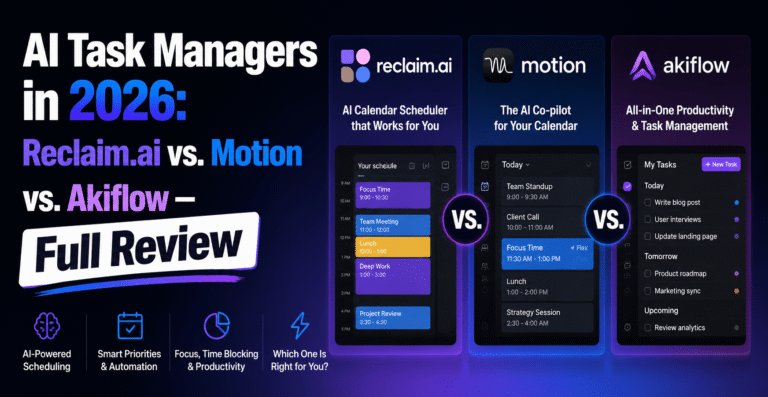
Notion AI and Motion are both labeled "AI productivity tools," but they solve completely different problems. Topiry breaks down which one actually deserves a spot in your workflow.
If your calendar looks like a losing game of Tetris and your to-do list has become a graveyard of good intentions, you’ve probably already asked the question everyone in productivity circles is asking right now: can an AI actually plan your day better than you can? Two tools keep coming up in that conversation — Notion AI and Motion — and while they get lumped together as “AI productivity apps,” they solve very different problems. In this review, the Topiry Team spent several weeks running both tools side by side across real work: content calendars, client deadlines, and the daily chaos of context-switching between meetings and deep work.
The Core Difference: A Thinking Space vs. an Autopilot Calendar
Before comparing features line by line, it’s worth understanding the philosophical split between these two products. Notion AI is a layer bolted onto a flexible workspace — it helps you write, summarize, and organize information inside documents, wikis, and databases you build yourself. Motion, on the other hand, is built around a single obsession: automatically scheduling your tasks, meetings, and projects into your calendar using an algorithm that re-shuffles your day whenever something changes.
Put simply: Notion AI assists a workspace you design. Motion designs your schedule for you. That distinction shapes almost everything else in this comparison.
Notion AI: The Swiss Army Knife for Knowledge Work
What it does well
- Writing and summarizing — drafting meeting notes, rewriting clunky paragraphs, and condensing long documents into digestible summaries.
- Database Q&A — ask questions across your entire workspace (“what did we decide about the Q3 budget?”) and get an answer pulled from scattered pages.
- Custom automations — combined with Notion’s databases, AI-generated status updates and auto-tagging make it useful for teams managing wikis, CRMs, or content calendars.
- Flexibility — because Notion is fundamentally a blank canvas, you can build the exact productivity system you want and let AI assist inside it.
Where it falls short
Notion AI does not manage time for you. It won’t notice that you’ve double-booked yourself or that a task is about to slip. If your bottleneck is time allocation rather than information organization, Notion AI alone won’t fix it — you still need the discipline to build and maintain the system.
Motion: The Calendar That Fights Back
What it does well
- Automatic task scheduling — you add a task with a deadline and estimated duration, and Motion slots it into open calendar time, rearranging things automatically as priorities shift.
- Meeting protection — it treats deep-work blocks with the same seriousness as meetings, which is arguably its best feature for people who chronically lose focus time to interruptions.
- Project and team views — Motion’s project management layer lets managers see workload distribution across a team, which helps catch overallocation before it becomes a crisis.
- Real-time replanning — when a meeting runs long or gets cancelled, Motion recalculates the rest of your day almost instantly.
Where it falls short
Motion is opinionated, and that can feel restrictive if you like manually curating your day. It also isn’t a knowledge or documentation tool — you won’t be drafting a client proposal or building a wiki inside Motion. Some users also report an adjustment period of one to two weeks before they trust the algorithm enough to stop double-checking it.
Head-to-Head Comparison
| Category | Notion AI | Motion |
|---|---|---|
| Primary function | Writing, summarizing, knowledge organization | Automated task and calendar scheduling |
| Best for | Teams and individuals managing documentation, wikis, content | People overwhelmed by meetings and shifting deadlines |
| Learning curve | Moderate — depends on how complex your workspace is | Moderate — requires trusting the auto-scheduler |
| Team collaboration | Strong, built for shared workspaces | Good, with team workload views |
| Calendar automation | None natively | Core feature |
| Ideal user | Writers, PMs, ops teams, content creators | Founders, consultants, anyone with a packed calendar |
Can You Use Both?
Yes — and many power users do. A common workflow the Topiry Team encountered repeatedly: use Notion as the single source of truth for documents, project specs, and notes, while Motion handles the actual mechanics of when tasks get done. They don’t compete for the same job, so there’s little redundancy in running them together, aside from the subscription cost.
Pricing Considerations
Both tools operate on tiered subscription models that have shifted over the past couple of years as AI features get bundled into higher-tier plans. Rather than quote figures that may already be outdated by the time you read this, we’d recommend checking current pricing directly on each vendor’s site — but as a rule of thumb, expect Motion to sit in the range of a “premium single-purpose app” (billed per user, per month) while Notion’s AI add-on is priced on top of its existing free-to-paid workspace tiers.
Our Verdict
If your biggest productivity leak is scattered notes, inconsistent documentation, or a team that can’t find anything, Notion AI is the stronger investment. If your biggest leak is time itself — meetings eating your focus blocks, deadlines sneaking up, tasks falling through the cracks — Motion will feel like hiring a very literal-minded assistant who never sleeps.
Neither tool is a silver bullet. AI productivity software still requires you to define what “productive” means for your specific workflow. But used deliberately, both can meaningfully cut down the administrative overhead of modern work.
Frequently Asked Questions
Does Notion AI schedule meetings for me?
No. Notion AI focuses on content generation, summarization, and search within your workspace. Scheduling is not part of its core feature set.
Is Motion good for teams, or just individuals?
Motion supports team workload views and project tracking, though it’s most commonly adopted by individuals or small teams first before expanding company-wide.
Which tool has a steeper learning curve?
Notion’s learning curve depends entirely on how complex a workspace you build. Motion’s learning curve is shorter structurally, but requires an emotional adjustment — trusting an algorithm to plan your day.
This review is part of Topiry’s ongoing AI Software In-Depth Reviews series, where we test productivity tools under real working conditions rather than relying on marketing claims.
About the Author